TikTok Comment Exporter
Questions, feedback, the occasional great idea. Keep them in a file you can work with. The TikTok Comment Exporter turns accessible public comments into CSV or Excel.
- No password, ever
- Public content only
- Nothing to install
The essentials, without the noise.
A format that fits.
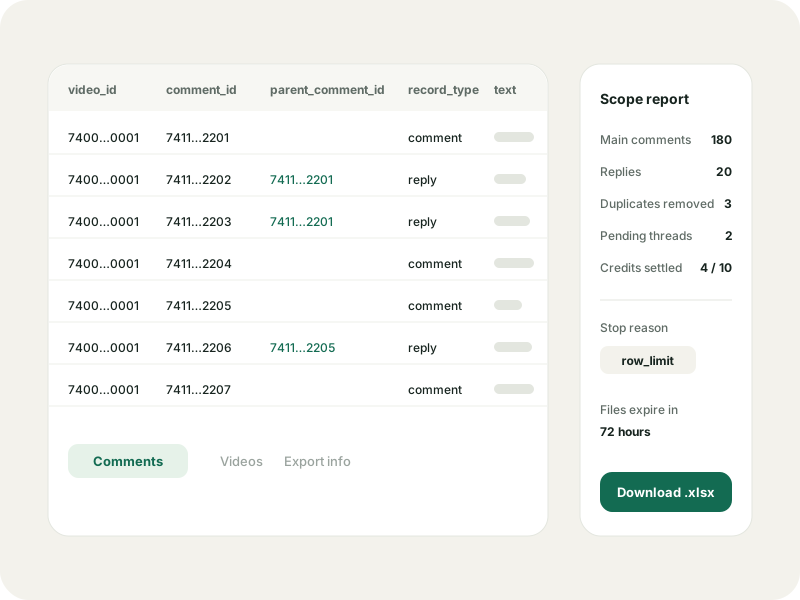
Choose CSV for another tool or an Excel workbook with Comments, Videos and Export info sheets.
Your scope. Your limit.
Choose whether replies belong in the file. Set a row cap and the most credits you want the job to use.
Know what is in the file.
The scope report lists retrieved counts, duplicate records removed, unfinished reply threads and the stop reason.
Three steps. You set the pace.
Enter
Paste a public video link or numeric ID, check the video details and sign in to GlimTok for your private export.
Choose
Choose CSV or Excel, decide whether to include replies, and set the maximum rows and credits.
Explore
Review the quote and confirm it. When a file is ready, download it with the report explaining what was collected.
A conversation you can work with.
Turn public comments into CSV or Excel with the TikTok Comment Exporter. Choose replies, set a row limit and review the credit quote before starting.
A GlimTok sign-in is required. Credits cover processing requests, not a guaranteed number of rows. Downloads expire after 72 hours, and a file may contain only part of the discussion.
TikTok Comment Exporter, ready for your next project.
Turn audience questions into a content plan. Gather feedback on a product mention. Keep a conversation for your research notes. Start with a public video and choose the rows you want to collect, without copying comments one by one.
The TikTok Comment Exporter includes comment text, video and comment IDs, parent IDs for replies, available author details, timestamps and reported counts. Each row keeps its video ID, so the conversation still has context once it leaves the page.
CSV or Excel. Make yourself at home.
Choose Excel for a workbook with separate sheets for Comments, Videos and Export info. Cells are stored as text, which preserves long IDs. CSV works well for importing into Google Sheets, Numbers or a script; set ID columns to text when you import them.
Include replies when the back-and-forth matters. Both main comments and replies count toward your row limit. Parent IDs let you connect the thread again in your spreadsheet, instead of treating every response as a standalone comment.
See the quote. Then decide.
Before the TikTok Comment Exporter starts a job, you choose its format, reply mode, row limit and credit ceiling. The quote shows the estimated processing range and any known limits. Confirm it when you are ready; changing the scope means getting a fresh quote.
Credits pay for processing requests, not a fixed number of comments. Cached pages, empty results and provider failures are not charged. Unused reserved credits are released when the job finishes. Buying a pack only adds credits; it does not start an export.
A free account includes a monthly allowance for small jobs. Free exports cover one video per job, while Pro supports up to ten. The limits shown in your account apply, and a row cap never guarantees that many accessible comments.
Keep the report with the rows.
A job can stop at a row or credit limit, or reach the end of what its source can return. When a partial file is available, the report explains how far it got. Check the separate counts for main comments and replies before treating the spreadsheet as a complete discussion.
Download your files within 72 hours of completion. During that window, you can generate the other format from retained rows without collecting them again. A later export is a new snapshot; comments and their availability may have changed.
The same rules on every page.
No TikTok login
You never enter a TikTok password, code or cookie. There is no account to connect.
Public content only
GlimTok shows what a public source makes available and never bypasses privacy settings.
Nothing loads until you ask
Your lookup loads the profile and its first content page. You choose when to load more or open comments.
A private saved list
Your bookmarks, groups and notes stay in your account. Saving never follows anyone.
TikTok Comment Exporter, answered.
Formats, replies, credits and download windows. Here is what to expect before you export.
Can I try the TikTok Comment Exporter for free?
A free GlimTok account includes a monthly export allowance for small jobs. Review the available credits and quote before confirming; larger jobs may need more credits.
Do I need to log in to TikTok?
No TikTok login is required. You do need to sign in to GlimTok so the export job and its downloads belong to your account.
Can the TikTok Comment Exporter include replies?
Yes. Choose the reply option before requesting a quote. Replies count toward the row cap and may need extra processing requests.
Will I get every comment on the video?
That cannot be guaranteed. Your limits and the source's access determine how much can be retrieved. The scope report explains the result.
Can I export several videos together?
Free accounts support one video per job. Pro allows up to ten. Each row includes its video ID so you can keep the discussions separate.
How long is the download available?
Export files and temporary rows expire after 72 hours. Within that window you can also generate the other format from the retained data.
Go a little deeper.
How to export TikTok comments to Excel
From a public video link to a scoped spreadsheet, with a quote you approve and a report you can trust.
Read the guideData limitsWhy exported comment counts differ from the app
Reported, retrieved and accessible counts answer different questions. Here is how to read each one.
Read the guideComment structureMain comments and replies: a practical guide
Read conversation structure without losing the parent and child relationship.
Read the guideTikTok Profile Viewer
Look up any public TikTok profile by username or link. See the bio, follower counts and recent posts without logging in or installing the app.
OpenTikTok Repost Viewer
Use the TikTok Repost Viewer to explore a public account's shared videos, with the original creator shown. Enter a username. No TikTok login needed.
OpenTikTok Comment Viewer
Read public comments with the TikTok Comment Viewer. Paste a video link, open replies and search the comments you load. No TikTok login needed.
OpenTikTok PFP Viewer
TikTok PFP Viewer for public profile pictures. Look up an account by username, view its public avatar and download the largest available image.
OpenGive those comments a place to go.
Open the TikTok Comment Exporter with a video link. Choose what you need, then review the quote.