TikTok Repost Viewer
The clips they couldn't keep to themselves. Use the TikTok Repost Viewer to explore an account's public reposts, one page at a time. Just bring a handle.
- No password, ever
- Public content only
- Nothing to install
The essentials, without the noise.
Find the clip they shared.
Go straight to an account's accessible reposts. Browse the videos that caught their attention.
Give the creator their credit.
Each result names the person who made the video, separately from the account that reposted it.
Pick up where you want.
Save a profile with Reposts as its preferred tab. Come back for another look whenever you like.
Three steps. You set the pace.
Enter
Enter the account's exact @username or paste its full profile link.
Choose
The profile appears first, followed automatically by the first page of accessible reposts.
Explore
Read the captions, check the original creators and load more when you want to keep looking.
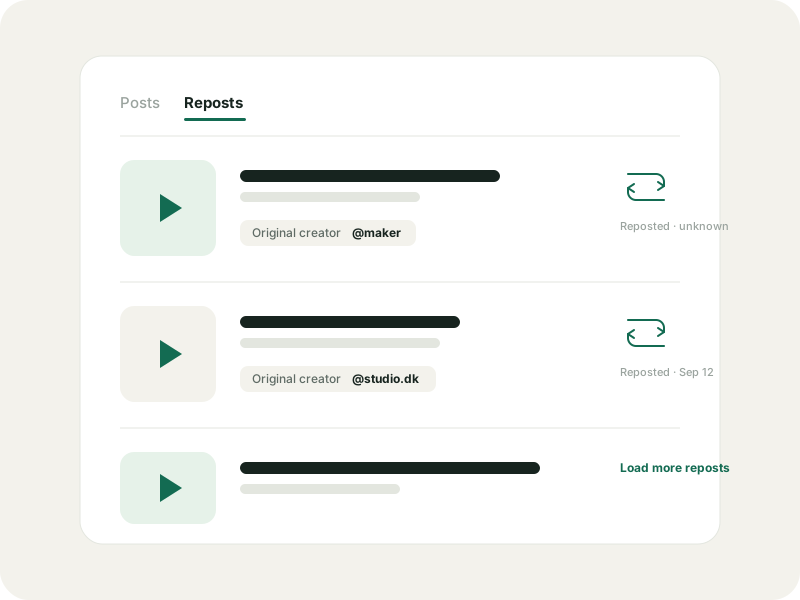
Their finds. The original creators.
Use the TikTok Repost Viewer to explore a public account's shared videos, with the original creator shown. Enter a username. No TikTok login needed.
Only accessible public reposts can appear. Results may be incomplete, and an empty page does not prove that an account has no reposts. Repost dates appear only when available.
A TikTok Repost Viewer for your next find.
A friend shared a recipe. A creator reposted a small artist. You remember the account, but the clip has slipped your mind. Start with that handle and browse the public videos it has shared, without signing in to TikTok.
The TikTok Repost Viewer works from an account outward. It shows accessible reposts for the profile you enter. If you start with a video and want a list of everyone who reposted it, this tool cannot provide that reverse search.
Who shared it. Who made it.
A repost points back to someone else's work. GlimTok keeps both people in view: the profile you looked up and the original creator named on each result. Captions and available counts help you recognise the clip before opening its details.
Dates need the same care. A video's publication date is not its repost date. When the source supplies a repost timestamp, it appears on the result. Otherwise the time stays unknown, so you are not left reading a guess as a fact.
A quick look, on your terms.
Use the TikTok Repost Viewer in a browser on your phone, tablet or laptop. No app to install and no TikTok password to enter. The first repost page loads with the profile. Choose Load more when you are ready for the next page.
Want to revisit an account? Save it privately in GlimTok and set Reposts as the tab it opens first. Opening your saved list reads the stored profile details. It does not follow the account or keep checking for new videos in the background.
Not every repost is within reach.
Privacy settings, removed videos and source availability can affect the results. An unavailable request and an empty page mean different things; neither gives you a complete picture of everything an account has ever shared.
GlimTok explains when loading stops. Use the results to discover a clip or explore a creator's interests, while leaving room for what is missing. Requests still pass through GlimTok and its provider, even though you have not connected your TikTok identity.
The same rules on every page.
No TikTok login
You never enter a TikTok password, code or cookie. There is no account to connect.
Public content only
GlimTok shows what a public source makes available and never bypasses privacy settings.
Nothing loads until you ask
Your lookup loads the profile and its first content page. You choose when to load more or open comments.
A private saved list
Your bookmarks, groups and notes stay in your account. Saving never follows anyone.
TikTok Repost Viewer, answered.
Finding a shared clip, checking dates or wondering what is missing? Start here.
Is the TikTok Repost Viewer free?
Yes. Browsing is free within a daily allowance. Enter a public username to start; no paid plan is required for a lookup.
Can I see someone's reposts without logging in?
You do not need to sign in to TikTok. GlimTok can show the public reposts its source makes available, without connecting your account.
Can I see private or deleted reposts?
No. The tool cannot unlock private content or recover removed videos. It can only return what is accessible at the time of your request.
Can I find everyone who reposted one video?
No. Start with a profile to see what that account has shared. There is no reverse lookup for all the accounts that reposted a particular clip.
Why is a repost date missing?
The source did not supply it. GlimTok leaves it unknown and never substitutes the original video's publication date.
Does the TikTok Repost Viewer work on mobile?
Yes. Use a modern browser on your phone or tablet. Paste the full profile link or type the exact handle, then open the Reposts tab.
Go a little deeper.
How to view public TikTok reposts without an account
See what a public account has shared, who made each video, and where the source stops.
Read the guidePrivacyWhat anonymous TikTok viewing really means
No TikTok login is a useful boundary, not a promise of invisible traffic. Here is the honest version.
Read the guideSaved profilesHow to save TikTok profiles privately with GlimTok
Local bookmarks, explicit import and a private cloud list, explained step by step.
Read the guideTikTok Profile Viewer
Look up any public TikTok profile by username or link. See the bio, follower counts and recent posts without logging in or installing the app.
OpenTikTok Comment Viewer
Read public comments with the TikTok Comment Viewer. Paste a video link, open replies and search the comments you load. No TikTok login needed.
OpenTikTok Comment Exporter
Turn public comments into CSV or Excel with the TikTok Comment Exporter. Choose replies, set a row limit and review the credit quote before starting.
OpenTikTok PFP Viewer
TikTok PFP Viewer for public profile pictures. Look up an account by username, view its public avatar and download the largest available image.
OpenSee what caught their eye.
Start the TikTok Repost Viewer with a username or profile link. A good find might be waiting.